This Thunderbolt 5 Dock has EVERYTHING for your MacBook!
This is the iVanky FusionDock Ultra, and it might be the biggest, baddest Thunderbolt 5 dock you’ll find: 26 ports, native quad-display support, 10 gigabit Ethernet, and 140 W charging. If you’re building a serious Apple silicon workstation, this is what the end game looks like. This video was sponsored by iVanky.
Some Thunderbolt 5 docks get really hot, some get bogged down by a single chip doing too much, and some don’t have enough Thunderbolt ports for more displays and storage. This one avoids all of that.
Design
Like the FusionDock Max 2’s solid aluminum wrap, but in a black that’s darker than the space black MacBook Pro, the Dark Knight version of a dock, with a gold alloy chassis that floats in the middle. It looks sleek and powerful, almost a statement piece, and the floating chassis helps with cooling.
Ports
Back: speaker and microphone ports; two Thunderbolt 5 host connections (80/120 Gb), which snap together magnetically to fit a MacBook perfectly, deliver up to 140 W to fully power a 16-inch MacBook Pro, and separate for a desktop Mac’s ports; four downstream Thunderbolt 5 ports for displays or fast storage; HDMI and DisplayPort; optical audio; a 10 Gb USB-C and two 10 Gb USB-A; and my favorite upgrade, 10 gigabit Ethernet.
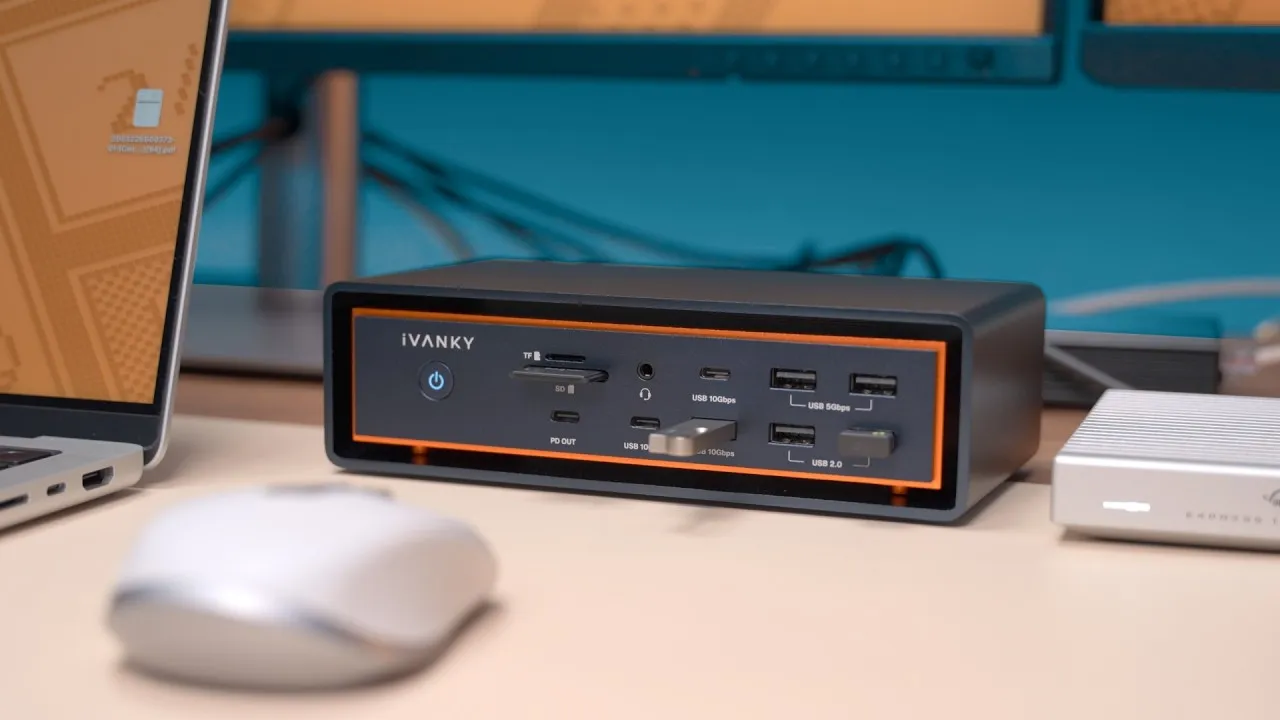
Front: every USB port is 10 Gb, two USB-A and seven USB-C, with the bottom-right USB-C delivering up to 45 W, enough to charge another MacBook. There’s an audio combo jack and microSD and SD readers, a little faster than my MacBook Pro’s and usable at the same time. The microSD slot is spring-loaded; I wish the full-size one was.
I don’t have enough devices to fill all of these. One note: unlike the Max 2, there’s no power button. When you disconnect the computer, the fans stop and it goes quiet.
Four displays
Natively, on compatible Macs, with no DisplayLink, third-party drivers, or screen-recording permissions. My M5 Max MacBook Pro ran a 5K Studio Display, a 1440p OLED at 240 Hz, and two 4K displays flawlessly. Support depends on your Mac, so check iVanky’s site.
Performance
The dual Thunderbolt chip design means my external SSD kept the same consistent speed even with multiple displays connected. I’ve lived with a Thunderbolt 10 Gb Ethernet adapter taking up a port; having it built in frees that port for another display or more fast storage. iperf to my NAS showed about 9.5 Gb/s, a 35 GB file copied to the NAS in under a minute, and I can edit videos off the NAS with no stutter.
Heat and noise
The floating chassis and iVanky’s adaptive twin fans work. Under light use the fans stay slow or off; under heavy load they ramp slightly. It’s about the quietest thing in my office. While running multiple displays, network tests, and disk benchmarks, my SPL meter couldn’t pick it out from the room’s ambient noise. It gets warm, warmer than the Max 2, but not hot like some docks, and I’ve had no disconnects or blanking displays.
Price
$649.99, marked down from $749.99, with an extra 10% off through the links below. It’s not cheap or for everyone, but it’s more dock than anything else out there. If you don’t need four displays or 10 Gb Ethernet, iVanky has the FusionDock Max 2 and FusionDock Pro. For me, the extra Thunderbolt 5 ports and built-in 10 Gb Ethernet check all my boxes, with room to grow.
Links
In this video
- 0:00 Intro: Biggest Thunderbolt 5 dock?
- 0:20 Design and build quality
- 0:59 Port overview and 26-port layout
- 1:15 Dual host connections and 140W charging
- 1:35 Thunderbolt 5 downstream ports
- 2:00 HDMI, DisplayPort, audio, USB, and 10GbE
- 2:35 Front ports, SD readers, and power USB-C
- 3:58 No power button + native quad display support
- 4:31 4-display setup demo
- 4:43 Display examples and 240Hz support
- 4:58 Mac compatibility note
- 5:08 SSD performance testing
- 5:23 10Gb Ethernet performance
- 5:27 NAS transfer and real-world workflow
- 6:09 Heat, fan noise, and thermal performance
- 6:09 Pricing and verdict
- 7:54 Final thoughts for different users
- 8:03 Closing recommendation
Some links in this post are affiliate links, which means that if you click on one of the product links, I may receive a small commission. See my ethics statement.