Best Budget Accessories for the M6 Mac mini
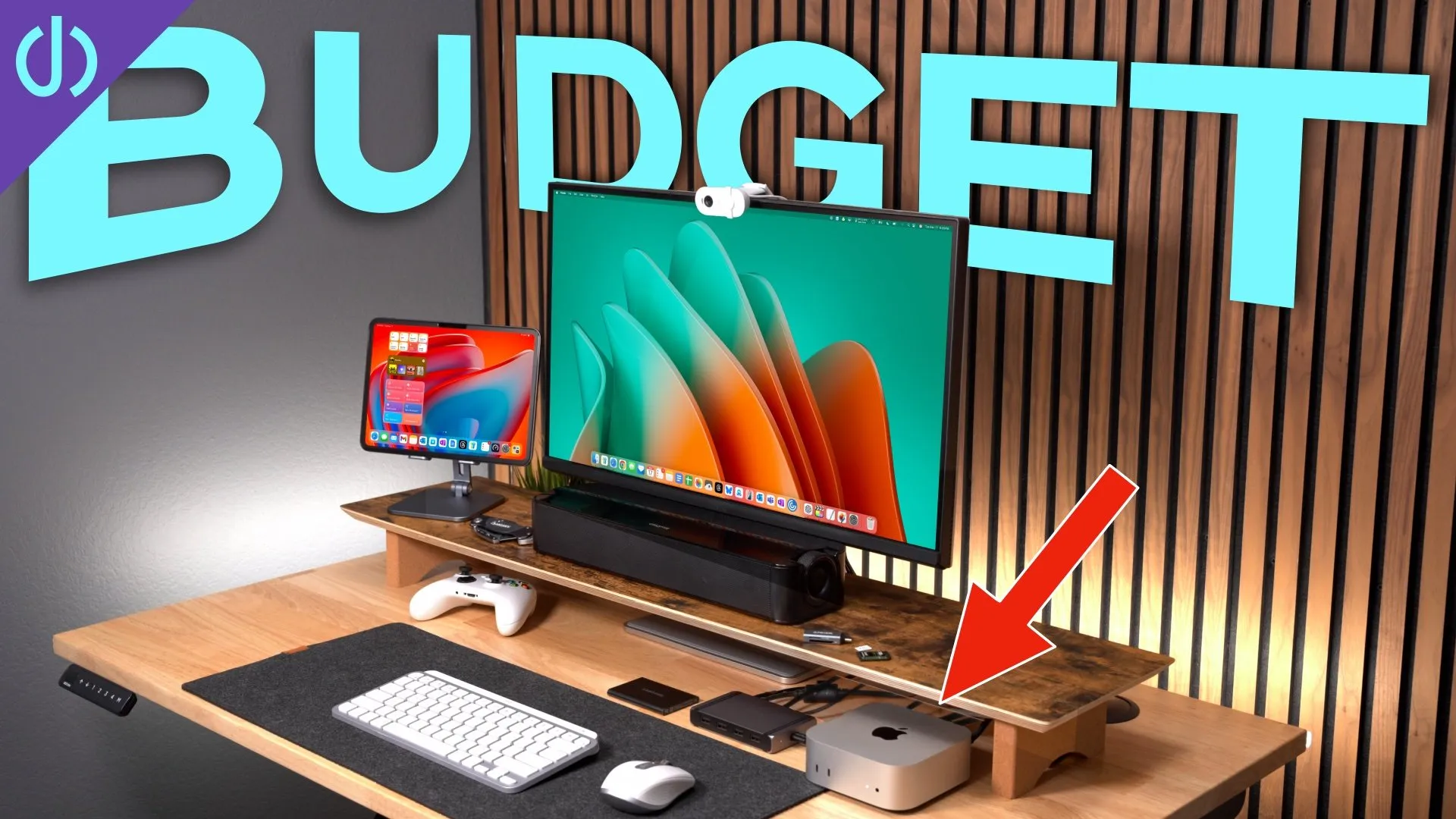
The M6 Mac mini now starts at $900, but it’s powerful enough that you don’t need expensive accessories to get a great setup. These are the ones I’d buy. Not all are the cheapest you can find, because I’m balancing price with a good experience: a $10 mouse exists, but it won’t feel or work well. The standouts are the Dell S2725QC display and the Logitech MX Anywhere 3S mouse. Many of these prices have dropped further with Black Friday deals, so check the links for current pricing.
The setup at a glance
| Accessory | My pick | Price |
|---|---|---|
| Display | Dell S2725QC | Around $250 |
| Monitor stand | Aothia 43-inch dual monitor stand | Around $60 |
| Desk mat | Aothia Faux Leather Desk Mat or DawnTrees felt desk mat | Around $16–17 (Aothia), $15 (DawnTrees) |
| Speaker | Creative Sound Blaster GS3 | $65 |
| Dock | UGREEN Mac mini dock | $55 |
| Storage | 1 TB WD Blue NVMe (in the dock) or Samsung T7 SSD | Around $180 (WD Blue, 1 TB), around $230 (T7, 1 TB) |
| Webcam | Logitech Brio 101 | $25 |
| iPhone mount | UGREEN MagSafe mount | Around $15 |
| iPad stand | Lamicall iPad stand | $10 |
| Keyboard and mouse | Three price tiers (table below) | $30–150 each |
Display: Dell S2725QC
I can’t recommend the Dell S2725QC enough; it’s one of the best displays I’ve tested at any price, and it looks better than many more expensive ones. It’s 4K at 120 Hz, so text in email, websites and social media is clear and sharp, and windows and animations move smoothly. It’s also one of the most consistent displays I’ve tested: I bought two, and their color and backlight match closely side by side.
- Brightness and contrast: up to 350 nits, bright enough for almost any office, and a 1,500:1 contrast ratio, so blacks look black and colors pop. Movies look great.
- Color: Dell doesn’t call it color-accurate, and I’d guess it covers about 80% of P3 and 100% of sRGB, but colors look great in everything I use it for.
- Connections: HDMI or USB-C, a few USB ports on the back, and a hidden pop-down panel on the front, so it can work as a hub.
- Speakers: two built in, better than most cheap displays, but I recommend a soundbar below.
- Controls: Dell’s Display and Peripheral Manager app lets your keyboard’s brightness and volume keys control the display, and it works over HDMI. So connect it with HDMI and keep the Mac mini’s Thunderbolt ports free.
Desk: stand and mats
- Aothia 43-inch dual monitor stand (about $60; black walnut, oak, white or black): I haven’t found a better desk shelf at this price. It holds up to 50 pounds, so two displays can sit on top, though I prefer the display on the desk, hovering over the shelf, for a cleaner look. The M6 Mac mini fits underneath, even on the UGREEN dock.
- Aothia Faux Leather Desk Mat (about $16–17; mine is beige, 38 × 13.7 inches): it comes in lots of colors and sizes. The soft underside keeps it from sliding, the keyboard stays put, and a mouse glides on the smooth surface. I’ve used these for a couple of years; they’re durable and easy to clean, and cheap enough to own a few colors.
- DawnTrees felt desk mat ($15, black or gray): if you prefer felt, it feels good under my hands, doesn’t get fuzzy, and works as well as much more expensive brands.
Audio: Creative Sound Blaster GS3
I bought and returned several speakers for this setup. Under $100, powered or not, they didn’t sound great, and they added cable clutter. The Creative Sound Blaster GS3 is a $65 soundbar that solves both: one cable runs behind the display to the Mac mini and powers it over USB-C. As a USB-C DAC, its volume follows the Mac, and there’s also a big physical knob. It’s surprisingly loud and clear, with enough low end to hear a bass drum or the rumble of an explosion. It won’t shake the room, but it handles music, podcasts, videos and movies well.
Dock and storage
The UGREEN Mac mini dock ($55) stands out among budget docks. The M6 Mac mini sits on top, and a plastic tab on the back presses the power button so you don’t have to lift it off.
- Ports (10): three 5 Gb/s USB-A and three 10 Gb/s USB-C on the back for things that stay connected, like a speaker or camera; two 10 Gb/s USB-A plus full-size SD and microSD slots on the front.
- Built-in SSD slot: holds an NVMe drive of up to 8 TB that’s always connected. It’s a 10 Gb/s USB-C dock, not Thunderbolt, so skip the fastest, most expensive drives; a 1 TB WD Blue NVMe (about $180) balances speed and price.
- One cable: it uses one port on the Mac mini, leaving two for Thunderbolt.
If you have another dock and just need storage, I still recommend the Samsung T7 SSD. A terabyte is about $230, which is crazy for 2026, but mine has worked for at least seven years of frequent use without a single failure.
Webcam: Logitech Brio 101
At $25, the Logitech Brio 101 is a true budget webcam. It’s only 1080p, maybe a step or two above a potato, but that’s all you need for work or school video calls. Logitech’s software can change settings, but you don’t need it; it works fine with macOS. A physical slider covers the lens for privacy.
iPhone and iPad
- UGREEN MagSafe mount (about $15): it’s meant for travel, like on a plane or train, but it clamps well to the desk shelf, keeping my iPhone off the desk and in view. The angle and rotation adjust easily, and the spring is so strong it’s a little hard to attach, but it isn’t going anywhere.
- Lamicall iPad stand ($10, aluminum, a few colors): compact and holds any angle. With Continuity, you can move your Mac’s mouse and keyboard over to control the iPad and its apps, or use Sidecar to make it a second display for a video or email.
Keyboards and mice: three price tiers
| Keyboard | Mouse | |
|---|---|---|
| Budget | Satechi EX1 Keyboard, $50 | Satechi EX Wireless Mouse, $30 |
| Mid-range | Logitech MX Keys Mini for Mac, $80 | Logitech MX Anywhere 3S, $90 |
| Apple | Magic Keyboard with Touch ID, $150 | Magic Mouse, about $60 on sale; Magic Trackpad, $120 on sale |
Satechi. The Satechi EX1 Keyboard types much like Apple’s Magic Keyboard in key travel and feel, which is what I prefer, and both it and the mouse come in colors that match the MacBook Neo. My one complaint: the extra Windows and Linux labels on the bottom keys look cluttered. The Satechi EX Wireless Mouse has a nice design, quiet clicks and a fine scroll wheel, but no side buttons for back and forward. Both pair with three devices over Bluetooth or the included dongle.
Logitech. The Logitech MX Keys Mini for Mac is a little heavier and larger than the Satechi, with dimpled keys that feel like they have a bit more travel, a backlight with three levels for dim rooms, and Mac-only labels. The Logitech MX Anywhere 3S is compact but fits my hand perfectly: ergonomic, quiet, with a scroll wheel that switches between ratchet and infinite scrolling (which feels more natural on a Mac) and two thumb buttons for back and forward. It’s probably my favorite mouse. The catch is Logitech’s software, which is bloatware; instead, the free Sensible Side Buttons app makes the thumb buttons go back and forward, in Safari for example. Both connect to three devices over Bluetooth or Logi Bolt.
Apple.
- The Magic Mouse adds touch gestures, like double-tap to zoom and two-finger swipes between spaces, which work well for me. If it’s too flat for your hand, a wooden grip raises it into a more ergonomic shape and makes a big difference by the end of the day.
- The Magic Trackpad isn’t a budget option, but there’s no budget trackpad. Even with a mouse, I like having one for gestures: pinch to zoom in Final Cut Pro, swiping between full-screen spaces, or giving my mouse hand a break.
- The Magic Keyboard with Touch ID has my favorite typing feel and matches Apple’s laptops, and Touch ID is nice when you unlock your Mac 10 to 20 times a day. But $150 is too much, especially without a backlight, when you can type your password or unlock with an Apple Watch. On a budget, I’d pick either of the other two keyboards.
The bottom line
Every accessory here balances price and performance, whether you use your M6 Mac mini for school, work, gaming or watching videos. If you spend more anywhere, make it the display and the mouse. Just set up your Mac mini? See my M6 Mac mini setup guide.
Links
- M6 Mac mini
- Dell S2725QC
- Aothia 43 inch dual monitor stand
- Aothia Faux Leather Desk Mat
- DawnTrees felt desk mat
- Creative Sound Blaster GS3
- Logitech Brio 101
- UGREEN Mac mini dock
- 1TB WD Blue NVMe
- Samsung T7 SSD
- UGREEN MagSafe mount
- Lamicall iPad stand
- Satechi EX1 Keyboard
- Satechi EX Wireless Mouse
- Logitech MX Keys Mini
- Logitech MX Anywhere 3S
- Magic Mouse
- Wooden grip
- Magic Trackpad
- Magic Keyboard with Touch ID
Some links in this post are affiliate links, which means that if you click on one of the product links, I may receive a small commission. See my ethics statement.