My Favorite Accessories for Apple Devices of 2020 for M1 MacBook, iMac, iPhone, iPad and Apple TV
2020 was kind of sus, but there were awesome tech products announced: the new MacBooks with M1, the last Intel iMac, the iPhone 12, 12 Pro, 12 Pro Max and 12 mini, and new iPads. As my last video for 2020, here are my favorite accessories for them.
iPad Magic Keyboard
The accessory I care about most for the iPad. It came out in the spring with an iPad Pro announcement as the pandemic started. The iPad Pro connects magnetically and hovers above, with a dual-hinge action that lets it fold back for laptop-like viewing angles. The 12.9-inch version has a full Magic Keyboard with the new scissor switches (all keyboards were replaced after the awful butterfly keyboards), much better than the Smart Folio keyboard, with no fabric coating and with backlighting. I wish it had a function row (to change volume and brightness and control media without going into Settings): maybe next time. With iPadOS 13.4, it adds a multi-touch trackpad like Apple’s others (not Force Touch: a physical click). It transforms the iPad from tablet to a real productivity device, a laptop replacement.
Apple silicone case for iPhone 12
The most important iPhone accessory is a case, for grip and protection. I like Apple’s silicone case because it has a soft-touch, smooth feel that doesn’t pick up crud or lint, and slides easily in and out of pockets, and it’s thin: a piece of plastic wrapped in soft silicone, which keeps bulk down. I said in a video on the iPhone 11 Pro cases, which started to come apart at the bottom, that I wouldn’t buy another until a significant redesign. It isn’t a significant redesign, but there’s added silicone at the bottom for more protection. I still think it will deteriorate, but I like the feel, it isn’t bulky, and I like the blue with my iPhone 12 mini.
Logitech MX Master 3
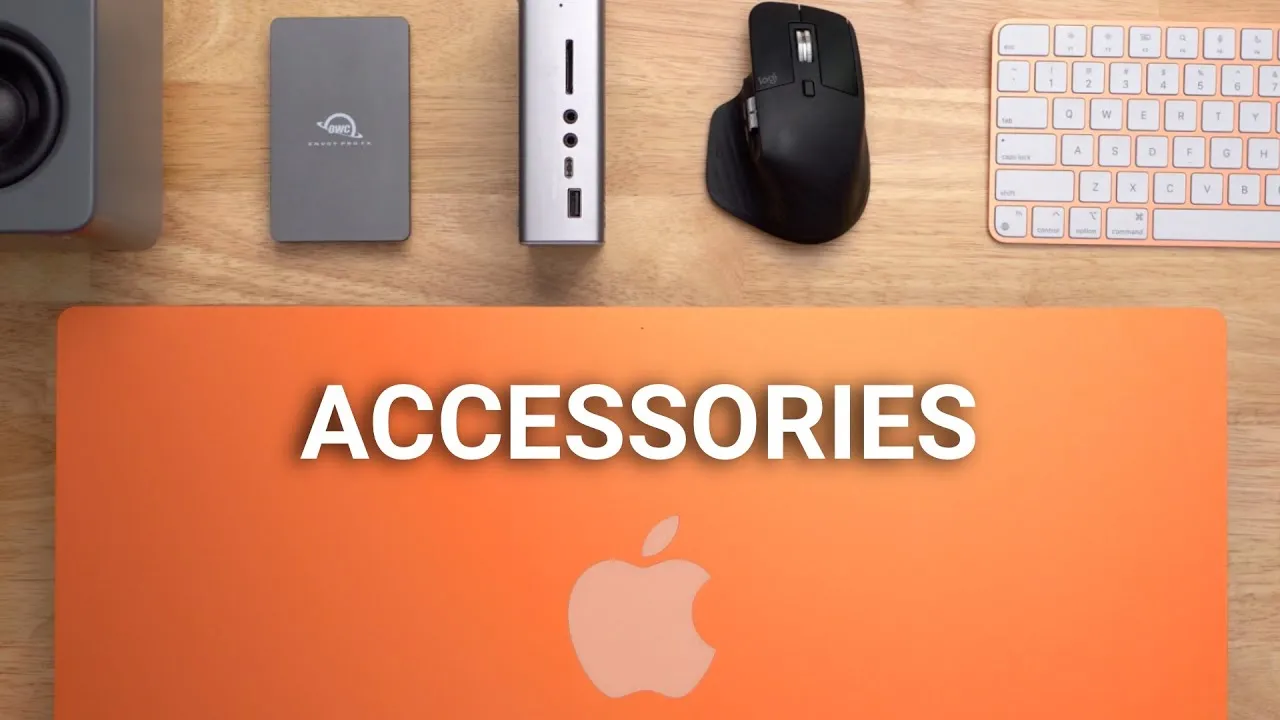
When I went back to the Mac after seven years, I was excited to use a Magic Mouse (Apple has nailed inertial scrolling), but my hand started to get fatigued, so I tried something more ergonomic. The MX Master 3’s scroll wheel has a clutch to engage or disengage: disengaged, it scrolls freely like the Magic Mouse’s inertial scrolling (flick on Twitter’s infinite scroll and it keeps going). It has a side thumb wheel for left/right scrolling (no inertia, but some apps, like Final Cut Pro, treat it as having it, scrolling the timeline and tapering off), back and forward buttons and a function button for gestures like Exposé or switching desktops. The Mac-specific version is Bluetooth-only; the regular version also includes the Unifying receiver, which helps if you have finicky Bluetooth, and can connect to other devices over Bluetooth.
Samsung T7 SSD
A tiny USB-C 3.1 Gen 2 SSD that reaches up to about 1 GB/s. Not Thunderbolt, but very fast for what it is: I can edit off it. I bought it with my 2020 iMac (512 GB internal) for more room: I can start a video edit on the iMac and unplug the drive, plug it into my MacBook Pro and keep editing the same file.
CalDigit TS3 Plus
A 15-port dock: on the front, USB-A and C, audio ports and SD cards; on the back, four USB-A ports, USB-C, Thunderbolt in and out, Ethernet, DisplayPort and optical audio. When I switched to the M1 MacBooks, I needed more than two USB-C ports. It connects with one Thunderbolt cable and charges the MacBook. It works with the iMac too, if you want more front-facing ports.
Twelve South BackPack
iMacs are the best desktop form factor in my opinion, for their clean, simple look. The Twelve South BackPack clamps onto the back stand of the iMac to hide hard drives or SSDs behind it. It includes adapters for different iMacs from the last decade, and cinema displays, and rubber columns to keep the drives from sliding off. I keep a couple of hard drives on it, always connected for file storage and Time Machine backups.
Aluminum laptop stand
A stand I bought for my M1 MacBook Pro that matches its aluminum almost exactly (space gray; also silver, and maybe gold, from different companies making the same stand). Loosen the side knob to change height, adjust the tilt, and twist it; the base is solid and sturdy with rubber pads on top and front. It’s great for a laptop as your main computer, or as a secondary monitor beside an external display.
Elago slim silicone case for the Apple TV remote
People have complained about the Siri Remote for years: small, slippery, easy to lose, and hard to orient in the dark. The silicone case makes it grippy and thicker, in the dark you know which way is up (only the touch pad is uncovered on the sides), and it’s big and bright red, so it won’t hide on the couch or slide between cushions. They have many colors, including glow in the dark.
AirPods
The most important accessory of 2020: just the regular AirPods (not the Pro or Max). For three years they’ve been one of three things always in my pocket: my phone, my wallet and my AirPods. The beauty is convenience: pop one out and start a podcast, the news or Spotify while standing in line or in a meeting. The reason is the size of the charging case; I don’t understand how no other wireless headphone maker has built a case this small. If they died today, I’d buy another pair tomorrow, even if they weren’t on sale. If I could only have one accessory for all my devices, it would absolutely be AirPods.
Thank you
I started the year with eight subscribers and am ending just shy of 10,000. Thanks to everybody who liked, shared, watched, subscribed and commented. My goal is to keep making content we both like and respond to as many comments as I can. I hope we all have a better 2021. (The description includes a promo line for Hope Mattress.) What accessories am I missing?
Links
- If this was helpful I have a tip jar
- Get 10% off using discount code Jerry
- iPad Magic Keyboard 12.9
- iPad Magic Keyboard 11
- Apple Silicone Case for iPhone 12 Mini
- Gray Aluminum Laptop Stand
- CalDigit TS3
- MX Master 3 Mouse
- Twelve South Backpack for iMac
- AirPods
- Samsung T7
- Elago Apple TV Siri Remote Case
- • M1 MacBook Issues Updates
- • M1 MacBook Issues
- • CalDigit docks for M1 MacBooks
- • Which iPhone 12 will I buy?
- • Turn the iPad into a Laptop
- • Should you get a Magic Mouse for the iPad Pro
- Sony A6400
- Sigma f1.4 16mm E Mount Lens
- Rode VideoMic NTG
- iPad Pro 12.9
- Used DJI OSMO 3 Gimbal for some shots
- Tascam DR-10L Audio Recorder with Lav
In this video
Some links in this post are affiliate links, which means that if you click on one of the product links, I may receive a small commission. See my ethics statement.